Gear

Using a handheld GPS and phone maps together: battery-saving tips for long ridge walks

Using a handheld GPS and phone maps together: battery-saving tips for long ridge walks

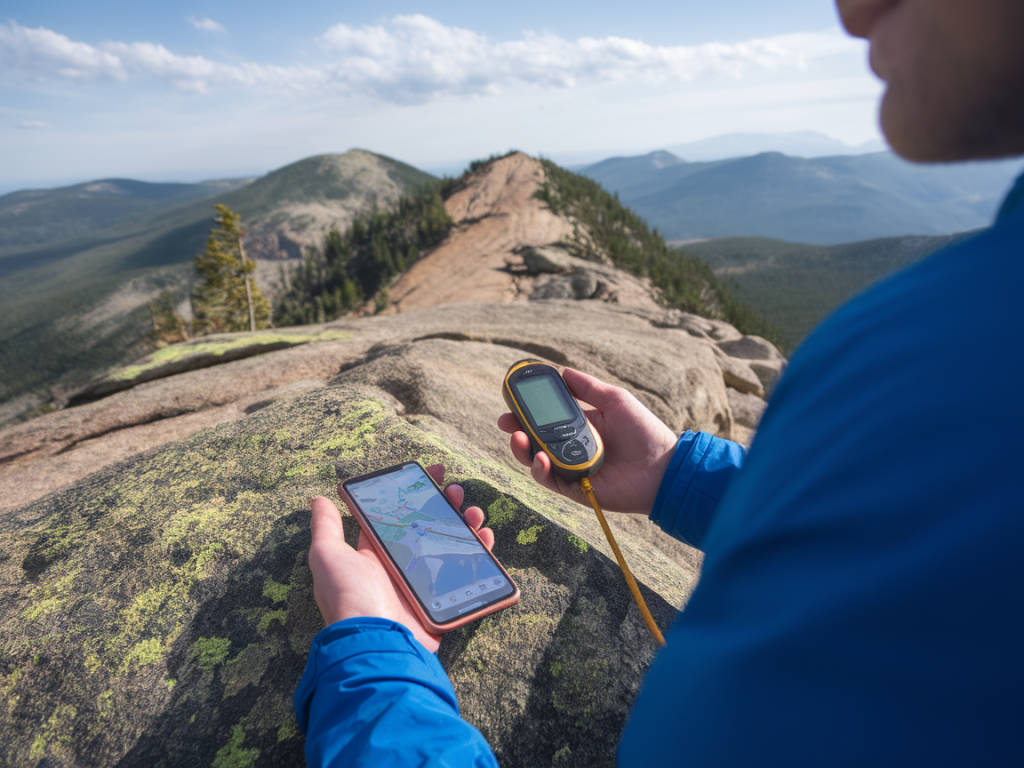
I’ve learned the hard way that a long ridge walk is not the place to discover your phone battery is dead and your handheld GPS has been quietly draining itself all morning. Over years on Britain’s windswept edges I’ve settled into a routine of using both a rugged handheld GPS and a smartphone together — each device playing to its strengths while avoiding the single point of failure that can turn a good day in the hills into an anxious scramble.

Why carry both a handheld GPS and your phone?

Your phone gives brilliant, high-resolution maps, photos and emergency contact ability; it’s fast to flick through routes and check up-to-date weather or transport. A dedicated handheld GPS (Garmin eTrex/InReach, Garmin GPSMAP, or similar) gives massively longer battery life, superior satellite reception in bad weather or deep gullies, and replaceable batteries or built-in emergency comms (in models with satellite messaging).

Used together, they complement each other: the phone is the comfy armchair map for planning and quick navigation, the GPS is the workhorse you rely on when conditions bite. But both draw power. My aim is to squeeze the maximum useful life from each device without compromising safety.

Prep before you go: map caching and route files

One of the simplest battery-saving steps is to do your heavy digital work before you leave the house.

  • Download offline maps—OS Maps, Gaia GPS, Komoot, OsmAnd or Maps.me all support offline areas. Pre-cache tiles for the whole route rather than relying on mobile signal on the hill.
  • Load GPX tracks into both devices where possible. I export and load the same GPX into my Garmin and into my phone app (Gaia or OS Maps). That way I can switch between devices and both will show the planned line.
  • Save waypoints and photos on the GPS or phone first, not while you’re moving. Uploading/processing photos or syncing cloud services on route eats battery.
  • Phone settings to conserve power

    On my phone I aim to reduce background drain while keeping GPS functionality. Here’s what I do every time:

  • Turn on Airplane Mode and then re-enable GPS only (some phones let you turn on Location while in Airplane Mode). This stops cellular radios and Wi‑Fi searching constantly, which is the largest battery sink.
  • Enable Low Power / Battery Saver mode.
  • Lower screen brightness manually and set a short screen timeout (15–30 seconds). The screen is the biggest power drain on modern phones.
  • Close unnecessary apps and turn off background refresh (Settings → Background App Refresh on iOS or Background Data on Android).
  • Turn off push email and messaging; I check messages at lunch rather than letting them wake the screen.
  • Handheld GPS settings that save hours

    Handhelds are built for long life, but settings still matter.

  • Use a slightly longer track log interval. Recording a track every second creates a great breadcrumb trail but consumes power and memory; 5–30 second intervals are usually perfectly adequate on a ridge.
  • Disable unnecessary radios. If your GPS has Bluetooth or Wi‑Fi and you don’t need them, turn them off.
  • Dim the backlight and use auto-off for the screen. I program my Garmin to keep the backlight off unless I press a button.
  • Consider unit-specific features: some units have power-save modes that lower GPS fix rates when stationary.
  • Device choreography on the hill

    I don’t run both screens full-time. I think of the devices as partner tools and assign simple roles.

  • GPS = primary navigation. It’s on a chest strap or in a map pocket where I can glance at it without digging out my phone. It shows the GPX track and my position reliably.
  • Phone = planning and reference. I bring it out for photo-worthy views, to check weather updates when I reach a summit, or to reorient on a complex junction. Otherwise it stays in a pocket in airplane mode.
  • Only one device actively logs the whole route. If I’m confident in the GPS I may switch phone tracking off to save battery, but I always ensure the phone has the GPX loaded so it can be used if needed.
  • Hardware choices that matter

    What you carry matters as much as what you switch off.

  • Use a handheld GPS with replaceable AA batteries if possible — they’re light, cheap and easy to carry spares for. A set of NiMH rechargeables plus a few alkalines in sealed bags is my default.
  • Choose a phone battery pack sized for the day. A 10,000 mAh power bank typically gives me 1–2 full phone charges; a 20,000 mAh unit is wise for multi-day or colder weather. Look for rugged or weather-resistant packs for outdoor use.
  • Consider a solar charger only as supplementary; UK weather makes them unreliable as a primary source. They’re handy on long sunny days but not a plan A.
  • For extended routes I carry a lightweight battery case or a small USB-C power bank that fits in a jacket pocket so I can quickly top up during breaks.
  • Cold weather and batteries

    Cold destroys battery performance. I keep spares inside my jacket rather than in the pack, and I’ll tuck a phone into an inner pocket at stops. If a handheld has removable batteries I keep a warm spare pack on my body. The small added weight is worth the protection it affords.

    Practical in-walk habits that save juice

    Good habits reduce reliance on raw battery capacity:

  • Plan checkpoints where you’ll intentionally check the phone/GPS — at path junctions, summits or known landmarks — instead of watching the screen constantly.
  • Use quick single-button screen checks rather than opening apps that reload large map tiles.
  • When pausing for food or photos, use that time to top-up the phone for 5–10 minutes from your power bank; a short boost often gets you to the next checkpoint.
  • Turn off the phone entirely if a long period of no navigation is expected (for example, a straightforward descent where the GPS track is sufficient).
  • What apps and combos I use

    My current go-to pairing is a Garmin GPSMAP handheld for route tracking and an iPhone running OS Maps or Gaia GPS with offline tiles. OS Maps has beautifully detailed UK mapping and allows me to carry OS vector maps offline; Gaia is brilliant for quick GPX imports and external map layers. For emergency comms I sometimes carry a Garmin inReach Mini linked to the GPS, giving messaging and SOS without needing phone signal.

    Device/Service Battery impact Role
    Dedicated handheld GPS (Garmin eTrex/GPSMAP) Low (designed for long life; replaceable batteries) Primary navigation, reliable fixes
    Phone (iPhone/Android) with offline maps High (screen & radio are heavy drains) Route planning, photos, emergencies
    Power bank (10–20,000 mAh) Medium (adds weight but restores multiple charges) Emergency top-ups, charge during breaks

    Final operational tip: test your setup

    Before a long ridge day, do a dress rehearsal: load the GPX, cache maps, set both devices to your planned power modes, and walk a short loop while recording battery drain. You’ll be surprised how much you learn — sometimes a phone app with a weird background service will eat far more than you expected, or a different log interval on the GPS will double run time.

    Long ridge walks are best enjoyed without battery anxiety. With a little prep, sensible device roles and a small power bank tucked into my pack, I can rely on my handheld for steady navigation and my phone for the human things — pictures, weather checks and, if needed, a lifeline. It’s a simple choreography that keeps me moving confidently across Britain’s wild edges.


    You should also check the following news: